160W Triple-Port Car Charger: USB-C PD + USB-A QC5.0
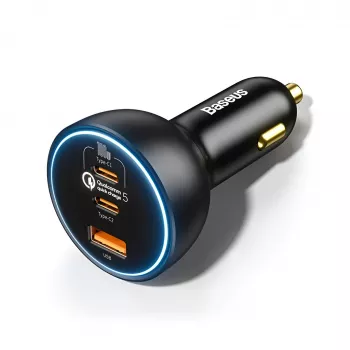
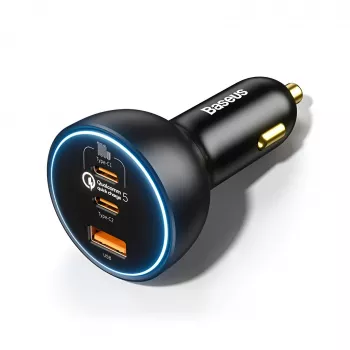
160W Triple-Port USB‑C & USB‑A Car Fast Charger (QC5.0 + PD): Power for Phones, Tablets, and Laptops on the Road
A high-output car charger can replace multiple adapters, keep navigation and music running, and top up a laptop between stops. This triple-port model combines USB‑C Power Delivery and USB‑A Quick Charge in a compact plug, aiming to deliver fast, stable power to several devices at once—without fighting over the only port.
What This 160W Triple‑Port Charger Is Designed to Do
This style of high-wattage, multi-port charger is built for drivers who treat the car like a mobile office (or a rolling family command center). The goal is simple: keep essential devices powered while minimizing cable chaos and “who gets the charger” arguments.
- Provide high total output for multi-device charging during commutes, road trips, rideshare shifts, or field work.
- Support modern fast-charging standards through USB‑C Power Delivery (PD) and USB‑A Quick Charge (QC) for broad device compatibility.
- Reduce cable clutter by powering a laptop/tablet on USB‑C while keeping a phone and accessories charging on the other ports.
- Offer a single in-car power hub for common setups: driver phone + passenger phone + tablet, or laptop + phone + hotspot.
Typical Use Cases by Port Mix
| Scenario | Ports Used | Example Devices | What to Watch |
|---|---|---|---|
| Workday travel | USB‑C + USB‑C | Laptop + phone | Use a USB‑C cable rated for PD/high wattage |
| Family trip | USB‑C + USB‑A + USB‑A | Tablet + 2 phones | Expect power sharing when all ports are active |
| Rideshare | USB‑A + USB‑A | Passenger charging cables | Label cables to avoid slow/charge-only cords |
| Outdoor kit | USB‑C + USB‑A | Power bank + headlamp/GPS | Some accessories charge slowly by design |
Ports, Standards, and Compatibility (Plain-English Guide)
Fast charging isn’t just about the charger. Your device and cable need to “agree” on a safe power level, and that agreement happens through charging standards.
Fast-Charging Standard Cheat Sheet
| Standard | Where It’s Common | How It Helps | Notes |
|---|---|---|---|
| USB‑C PD | Phones, tablets, laptops | Negotiates higher voltage/current safely | Device and cable must support the requested power |
| Qualcomm Quick Charge | Many USB‑A Android devices | Higher power over USB‑A when supported | Falls back to standard charging on unsupported devices |
| Standard USB charging | Everything | Baseline power delivery | Slowest option; still useful for accessories |
For deeper background on the standards themselves, see the official references from USB-IF (USB Power Delivery) and Qualcomm (Quick Charge). For iPhone/iPad charging behavior and adapter basics, Apple’s guidance is also helpful: Apple Support.
Real-World Charging Setups That Make Sense
Simple Port Assignment Guide
| Device Type | Best Port to Start With | Why | Backup Option |
|---|---|---|---|
| USB‑C laptop | USB‑C (PD) | Most likely to request higher wattage | Other USB‑C port (if available) |
| Modern phone (USB‑C) | USB‑C (PD) | Fast negotiation and efficient charging | USB‑A (standard/QC if supported) |
| iPhone (Lightning cable) | USB‑C (via USB‑C to Lightning) | Often faster with PD | USB‑A (standard) |
| Accessories (earbuds, watch puck) | USB‑A | Low power needs | USB‑C (standard charging) |
Safety, Heat, and Daily Durability Checks
Quick Troubleshooting Checklist
| Issue | Likely Cause | Try This First | Next Step |
|---|---|---|---|
| Charging is slow | Cable not rated for fast charging | Swap to a known PD/QC-capable cable | Test another device on same port |
| Connect/disconnect cycling | Loose socket or debris | Re-seat plug; check socket fit | Try a different 12V outlet |
| Device gets hot | High load + fast charge + warm cabin | Reduce screen brightness; remove case | Pause fast charging temporarily |
| One device charges, another doesn’t | Port/cable mismatch | Move device to a different port | Confirm device supports PD/QC |
Product Snapshot: 160W Triple‑Port USB‑C & USB‑A Car Fast Charger QC5.0 PD
At-a-Glance Details
| Item | Details |
|---|---|
| Product | 160W Triple-Port USB‑C & USB‑A Car Fast Charger QC5.0 PD |
| Price | $40.51 |
| Availability | In stock |
Extras for the Road: Small Add-Ons That Pair Well with a Powered Setup
- The Ultimate Productivity Blueprint for organizing travel days, work blocks, and routines when you’re moving between locations.
- Stronger Together: Family Bonding Pack for screen-free activity ideas that work at rest stops, parks, or after check-in.
- Confident Kids Bundle: Nurturing Emotional Strength for simple, structured activities that can fit into travel days with young kids.
FAQ
Will a 160W car charger fast-charge a laptop?
It can, as long as the laptop supports USB‑C Power Delivery and you use a USB‑C cable rated for the wattage. Charging speed may decrease when multiple ports are in use, and some laptops draw less power from a car charger than from their full-size wall adapter.
Can Quick Charge and USB‑C PD be used at the same time?
Yes, multi-port chargers are typically designed for simultaneous use. Each device negotiates its own charging profile, but the charger’s total output is shared, so peak speeds can drop when all ports are active.
Why is my phone not showing “fast charging” in the car?
Common causes include a cable that isn’t PD/QC-capable, a phone that doesn’t support the standard on that port, heat-related throttling, or a weak/loose vehicle socket. Try swapping to a known good cable, switching ports, and testing a second device to isolate the issue.









Leave a comment